
macOS menu bar · CLI · MCP
Port 3000 is taken. Who took it?
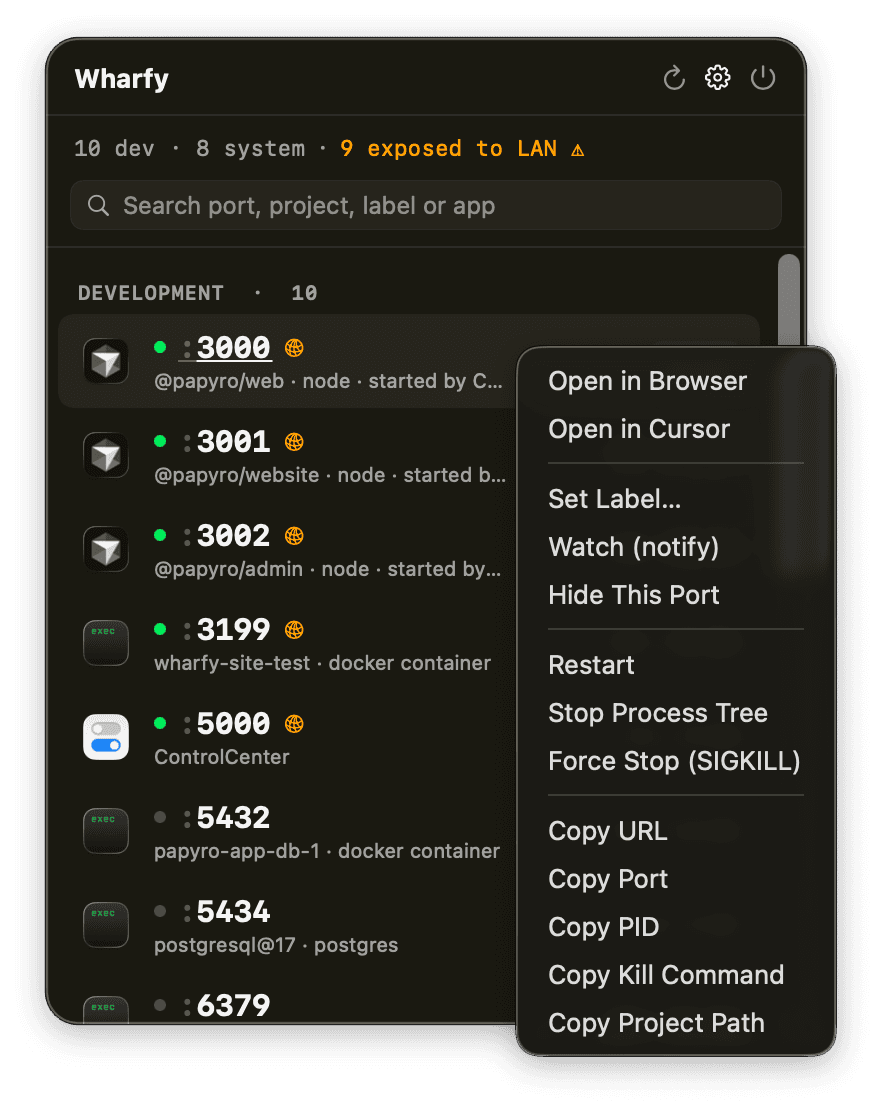
Wharfy shows every listening dev port with the app — or AI agent — that opened it, warns you when a server is exposed to your LAN, and stops it safely.
macOS 14+ · Apple notarized · free beta · MIT CLI
Wharfy ProYour ports, remembered.
$ wharfy list
PORT   PID    USER      PROCESS ← PARENTS
3000   51530  egebilge  node ← claude ← zsh ← Terminal
3001   51612  egebilge  node ← cursor ← launchd
5432   1201   egebilge  docker: papyro-app-db-1
Who opened it
The full parent chain, with the starter's real app icon. A port opened by Claude Code says so. One opened by Cursor says so. No more pid archaeology.
Exposed to your LAN
Dev servers bound to 0.0.0.0 are visible to everyone on your network. Wharfy flags them, and filters the list to just those in one click.
Stops safely
SIGTERM, a grace period, then SIGKILL. Tree-kill stops the whole npm-run-dev tree without ever crossing into your shell or IDE.
Knows the difference
Docker containers get docker stop. macOS services — AirPlay lives on :5000 — get a warning before you break something.
Wharfy Pro
Your ports, remembered.
Free Wharfy tells you who has the port. Pro tells you what happened to it — and stops it happening again.
14-day trial · no card · works offline · no account
For your AI agents — MCP
Six tools — list_ports, kill_process, wait_for_port, suggest_free_port and friends — so your agent cleans up after itself instead of asking you to.
CLI
Also on npm. MIT licensed, macOS only.